September 19, 2008
Sunday morning 21/9/2008, the new bol.com store was temporarily online.

It is definitely an improvement to the old site. Previously when searching for the band daryllann, there were no results whatsoever. The new site now changes the incorrectly spelled band name to the correct spelling. This means that the site is more forgiving to spelling mistakes. This should help conversion rates. Although….. the album Renko found on Bol.com is not the correct album: Renko…..bol.com still have to sort out some data issues.

Revamped product sections
All product pages are revamped, but especially the games, DVD and music sections look hugely different. The site looks and behaves the same across the different product groups now.
I love the feature that you now can search for children games or hardcore games. Ordering a PEGI 3+ game for a four year old is not what PEGI is about. PEGI rating just sucks™

Shopping basket
The shopping basket and checkout has pretty pictures.
Nice eye candy.
Pretty urls
http://www.bol.com/nl/p/games/metal-gear-solid-4-guns-of-the-patriots/1004004006052238/index.html
Bol.com has got rid of all the ugly urls they used to have. SEO to the max.
Payments
Unfortunately the Postbank was experiencing problems which caused problems with my Postbank credit card or iDEAL payments. This killed some of the experience, but this is not something Bol.com can help. It was handled gracefully on the bol.com site. My Visa card had no problems whatsoever… Good… good..
Next steps?
ATG and Endeca transformation almost done. Time for the next phase….
Leave a Comment » |
ATG, Digital world, Endeca, bol.com | Tagged: ATG, bol.com, Endeca |
Permalink
Posted by Ronald Pulleman
June 16, 2008
Some time ago I wrote about selfdiagnose-the-world-according-to-my-atg-application.
Since then SelfDiagnose has added some nifty features. The latest release of SelfDiagnose now adds support for OGNL. This gives SelfDiagnose some extra punch. I can now use constructions like:
<checkvaluematches
value="${@java.lang.Integer@parseInt(configList.length)}"
comment="Number of configured Endeca instances"
pattern=".*" />
or constructions like
<checkendecaservice host="${configList[0].host}"
port="${configList[0].port}" query="N=0" comment="Endeca instance 1 connection test"/>
The ${configList[0].port} is a typical OGNL construction.
The CheckEndecaService can also return the Endeca com.endeca.navigation.ENEQueryResults response.
With OGNL you can easily dissect this Endeca response.
This can be extremely handy to query for the latest Forge or pipeline version of an Endeca build in the different ATG environments were you cannot directly access those services! For instance in production.
1 Comment |
ATG, Endeca, OGNL, SelfDiagnose | Tagged: ATG, Endeca, OGNL, SelfDiagnose |
Permalink
Posted by Ronald Pulleman
April 17, 2008
We have all been there, when developing a J2EE application, the environment nightmares. When your stuff goes through the different stages of integration, acceptance, production etc. Stuff just breaksTM, because of misconfiguration. Configuration which you have no control over.
Missing a database table here, a JNDI binding forgotten, a URL not reachable, weird classloading nightmares, because another jar is being used in acceptance.
Here is where SelfDiagnose comes to the rescue. Somehow this little gem gets no press whatsoever. Lately some new tasks have been added to the mix. This blog by Ernest explains something about compile-time dependencies. But more interestingly (to me), SelfDiagnose now contains an CheckAtgComponentProperty task and a CheckEndecaService.
The CheckAtgComponentProperty lets you check an ATG property. I know this can be done with ATG’s component browser as well, but hold on.
The CheckEndecaService will check the availability of the Endeca service.
The combination of these tasks and the chaining of these creates a powerful diagnosis. See the following snippet of code, where first an ATG property is queried which then is chained to the Endeca task. Another nifty SelfDiagnose feature.
This code is heavily customer oriented, but you will get the idea.
1 <checkatgcomponentproperty
2 component="/wsp/common/services/search/balancer/connections/EndecaConnection"
3 property="host"
4 comment="Endeca Host"
5 var="eneHost"/>
6 <checkatgcomponentproperty
7 component="/wsp/common/services/search/balancer/connections/EndecaConnection"
8 property="port"
9 comment="Endeca Port"
10 var="enePort"/>
11 <checkendecaservice host="${eneHost}" port="${enePort}" query="N=0"/>
The real cool and not so well understood part about SelfDiagnose in my opinion, is that it will check a bunch of tasks from inside the environment you are executing. This means that the above example will output the ATG configuration and check the configured Endeca instance of the actual environment.
Hitting the selfdiagnose.html url will show:
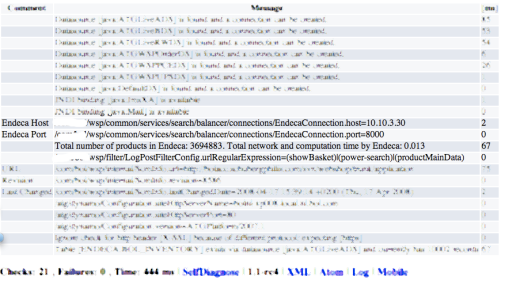
I just mentioned the ATG and Endeca tasks, but there is a lot more which can be extremely helpful.
This nifty feature can save some energy when something is misconfigured. Checking the selfdiagnose URL can save a lot of time.
2 Comments |
ATG, Endeca, SelfDiagnose | Tagged: SelfDiagnose |
Permalink
Posted by Ronald Pulleman
January 17, 2008
Are you living in the Netherlands and need a book, a nice Cd, perhaps a Dvd, the latest Wii game or what have you, use the this affiliate thingabee. You will make Darryl happy.
I know I will use it.
Darryl’s commuting habits need a faster car.
1 Comment |
ATG, Endeca |
Permalink
Posted by Ronald Pulleman
November 4, 2007
In my current project we use atg.nucleus.logging.ApplicationLogging. This is with ATG 2007 on JBoss.
At the start it was decided to use the ATG logging API in stead of Log4J (or
any other Java logging framework). ATG and ApplicationLogging was common practice, why not use it I was told.
Later when I saw the code littered with complicated logging statements where the programmer had to include the method from which the Logging statement was executed I was not so sure.
1 Log4J ConversionPattern
Adding the containing method to your logging statement is not necessary. You can use the Log4J ConversionPattern %M in the PatternLayout.
which is used to output the method name where the logging request was issued.
It should be used with care of course since it is a performance drain. But we can alter this at runtime so that’s no biggie (see 2). But…
ATG logging attaches to JBoss logging, however the %M is lost since the ATG logging method is considered as the issuing method. So the
logDebug logInfo, LogError etc, are reported to be the issuing method, in stead of the actual method. Pretty useless.
This would not have happened if ATG ApplicationLogging was not used, but plain Log4J.
2 Different logging level
A used argument is that you can alter the logging level of the individual components in the ATG admin console.
This is trivial. You can also do this in Log4J.xml with the Log4J categories.
3 Dynamic Logging Level
Another argument: You can change the logging level in ATG without restarting the server.
Look at JBoss Log4JService. This automatically picks up changes to Log4J.
Moral
- Don’t use
atg.nucleus.logging.ApplicationLogging you butcher Log4J features.
- Don’t think, because you have some patterns which used to work, that that is the best pattern in the future.
What worked with DAS does not necessarily work with JBOSS.
- Think.
Leave a Comment » |
ATG, JBoss, Log4j |
Permalink
Posted by Ronald Pulleman